

MatchQ: Run Slurm on AWS, Production-Ready from Day One

You know Slurm. You know AWS.

You also know the gap between them. The weeks of scripting cloud connectors, building monitoring, wiring up accounting, and dealing with mistakes that crash jobs.

MatchQ closes that gap by deploying a complete, production-grade Slurm cluster directly into your AWS VPC via CloudFormation.

Upstream Slurm, your account, your control, with everything you’d otherwise spend months building already done.

Upstream Slurm. Fully Operational Ecosystem.

MatchQ uses standard, upstream Slurm with no parameter restrictions, so your existing job scripts, workflows, and expertise carry over unchanged.

What MatchQ adds is the ecosystem around it:

Icon

Pre-configured cluster-wide and per-node dashboards

Pre-configured cluster-wide and per-node dashboards

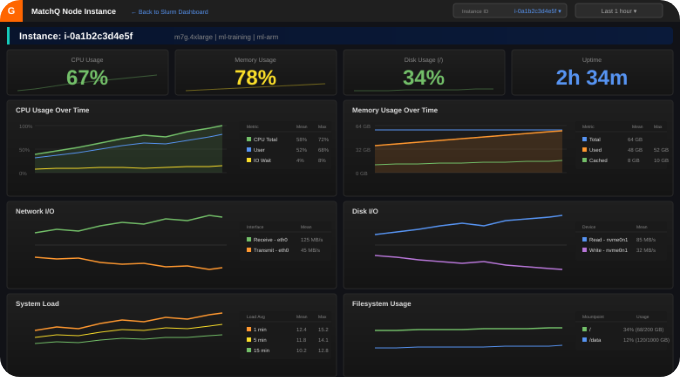
Drill down to individual nodes for CPU, memory, disk, network, and system load metrics, all correlated with AWS infrastructure data.

Icon

Job-level cost intelligence

Job-level cost intelligence

Every running job is automatically enriched with AWS metadata such as instance ID, instance type, lifecycle, and hourly cost, making it easy to query and analyze spending directly from Slurm's accounting records.

Icon

Operational helper scripts

Operational helper scripts

Purpose-built CLI tools for creating partitions, nodegroups, and launch templates without editing config files directly.

Icon

Slurm accounting included

Slurm accounting included

Managed RDS database for sacct, job history, and usage reporting, configured out of the box. No add-on fees.

Icon

Multi-architecture support

Multi-architecture support

ARM64 Graviton head nodes for cost efficiency, with mixed ARM64/x86_64 compute fleets. Spot and on-demand in the same cluster.

Icon

Elastic compute

Elastic compute

Automatic EC2 provisioning via CreateFleet API with constraint-based scheduling. Slurm features and weights for fine-grained workload placement across instance families and purchasing options.

One deployment. Fully operational Slurm environment. Ready for jobs.

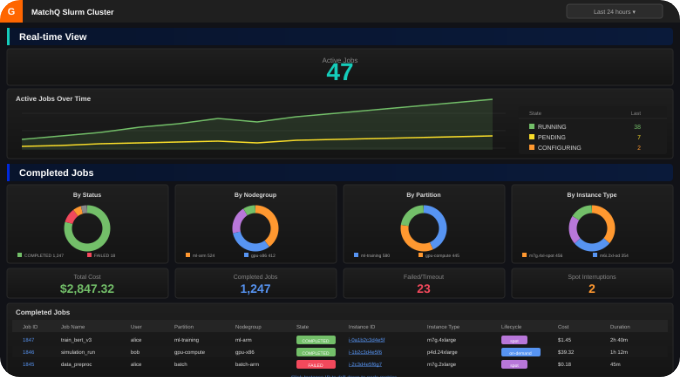
Cluster Dashboard View

Cluster Dashboard

Real-time job activity, completed job analytics, cost tracking, and spot interruption monitoring.

Node Dashboard View

Node Dashboard

Per-instance CPU, memory, disk, network, and system load metrics with drill-down by instance ID.

How MatchQ Works

From job submission to teardown, fully automated and with continuous visibility.

1

User submits job (sbatch / srun).

2

Slurm evaluates queue and resource requirements.

3

MatchQ provisions EC2 nodes
(Spot / On-Demand via Fleet API).

4

Jobs run on provisioned compute.

5

Nodes terminate when queue clears.

Continuous Processing Icon

Running continuously in parallel:

  • Real-time dashboards
  • Job cost intelligence enriching Slurm accounting with AWS data
  • Spot interruption detection and automatic requeue
  • Optional helper scripts for partition/nodegroup management
Built and Backed by HPC Engineers

Built and Backed by HPC Engineers

MatchQ isn't built by a product team that just read the Slurm docs. It's built by Modality Cloud Services, an AWS Advanced Consulting Partner whose engineers have been designing and supporting HPC on AWS, and specifically Slurm on AWS, for many years across semiconductor, life sciences, AI, and media workloads.

When you run MatchQ, you get direct access to the engineers who built it. People who work with Slurm clusters daily, from debugging complex EC2 startup issues to designing partition strategies and optimizing Spot usage. Whether you're migrating from PBS or Sun Grid Engine, building a hybrid cluster that manages on-prem and cloud compute from a single controller in your VPC, or scaling an existing environment, Modality's team works alongside yours.


What Our Customers Say

Quote

Convergent RnR employs advanced Monte Carlo radiation transport simulations and scalable HPC workflows to accelerate development of the Convergent Bragg Lens radiation platform. Through collaboration with Modality and the MatchQ platform on AWS infrastructure, computational runtimes were reduced from weeks to hours, enabling rapid iteration of photon interaction models, dosimetric optimization studies, and advanced radiation therapy design evaluations. The environment was also continuously optimized for cloud efficiency through intelligent Spot usage, workload-aware instance selection, and minimizing unnecessary data transfer costs.


Ella Gebert, Convergent RNR

Quote

Our existing cloud HPC workflows were primarily built around PBS. When a joint customer requested a migration to Slurm on AWS, MatchQ and Modality enabled us to adapt the environment and operational model in a very short timeframe. The platform simplified the transition significantly, while Modality’s engineering support helped ensure the migration was smooth, production-ready, and aligned with the customer’s existing EDA workflows.


Shawn Ruby, RubyEDA

Quote

As our AI workloads scaled, we started hitting operational and orchestration limitations with AWS Batch. MatchQ gave us a production-ready Slurm platform on AWS with the flexibility, automation, and operational visibility we needed, while Modality’s engineers helped optimize the environment for real-world AI workflows.


Ido Port, CADY

How MatchQ Compares

MatchQ, AWS PCS, and AWS ParallelCluster represent different operational models for running Slurm on AWS. Each has its strengths depending on your team's priorities around control, cost, and operational overhead.

AWS PCS

AWS PCS is a fully-managed SaaS offering, where AWS hosts and manages the Slurm controller for you. This reduces operational overhead for controller infrastructure, and this matters for teams that want a hands-off experience.

The tradeoffs are in cost, flexibility, and control:

  • PCS charges per-instance management fees on top of controller fees
  • Enabling Slurm accounting adds another $700–2,000/month for the database
  • At scale (for example, a 500-node cluster), PCS management fees alone can reach $30,000/month before any EC2 spend
  • Active and queued jobs are capped at 16,000
  • Not yet available in all AWS regions
  • Key cluster settings (including Slurm version, security groups, and cluster size) cannot be modified after creation, and changing them requires the creation of a new cluster and migrating workloads
  • Post-deploy configuration changes are limited to accounting settings, scale-down idle time, and a subset of Slurm parameters
  • PCS hybrid support allows using an on-premises machine as a login node for job submission to AWS and does not currently support federated scheduling or running jobs on on-premises compute

MatchQ takes
a different approach

With everything that runs inside your VPC under your control. There are no per-instance fees, and only a controller subscription via AWS Marketplace, with optional Enterprise support. You get full upstream Slurm with no parameter or job count limits, along with built-in monitoring, accounting, and cost intelligence.

Slurm version upgrades are done in-place using the built-in matchq-upgrade tool, with automatic rollback if needed. For hybrid workloads, MatchQ provides a single management plane for jobs running on-prem, in AWS, or both, managed from one Slurm controller in your VPC.

AWS ParallelCluster

AWS ParallelCluster is free and open source, and provides full access to Slurm. It is a strong starting point for teams with deep HPC expertise and time to build out the operational layer themselves.

ParallelCluster does not include:

  • Monitoring dashboards
  • Cost tracking
  • Accounting database setup
  • Production hardening

As a result, teams often spend weeks or months building these components to reach a production-ready state.

Upgrades are also complex. Each ParallelCluster release includes a fixed Slurm version baked into its AMI, and upgrading to a new release (and its newer Slurm version) requires creating a new cluster and migrating workloads while running clusters stay on the same version they were created with.

Minor Slurm patches within the same major version can be applied manually by compiling from source on the head node. Each ParallelCluster minor version has a scheduled end-of-support date, after which no fixes are provided.

There is no paid support option, and support is limited to community channels and GitHub.

MatchQ provides
a production-ready
environment out of the box

with integrated monitoring, cost visibility, managed accounting, and built-in operational tooling, and all with an engineering team to back it up.

Comparison at a Glance

Capability
MatchQ
AWS PCS
ParallelCluster
Operational model
Self-hosted in your VPC
Fully managed
(AWS-hosted controller)
Self-hosted in your VPC
Pricing model
Controller fee
(Marketplace subscription)
Controller + per-instance
management fees
Free (open source)
Slurm version upgrades
In-place upgrade (matchq-upgrade
tool with rollback)
Requires new cluster
(version locked at creation)
Manual (compile from source for
patches; new cluster for major upgrades)
Post-deploy config changes
Full access to all settings
Limited (accounting, idle time,
some Slurm params)
Some settings require new cluster
Job queue limits
No limit
16,000
No limit
Built-in dashboards
Yes (cluster + node level)
No (CloudWatch available)
No (manual setup)
Slurm accounting
Included (managed RDS)
Optional add-on ($700–2,000/mo)
DIY (customer manages DB)
Job cost intelligence
Built-in
(AWS data in Slurm accounting)
No
No
Instance tagging
Yes (per nodegroup)
Yes (per nodegroup)
Yes (per compute resource)
Operational tooling
Helper scripts included
Limited console/CLI options
DIY
Hybrid support
Full (single control plane)
Login node only, no federation
Limited (community only)
Region availability
No limit
Limited regions
Most regions
Support
Basic support included,
enterprise support available
AWS support plans
Community / GitHub only
(no paid support option)
Ongoing HPC review & guidance
Yes (Modality engineers)
Not included
Not included
Production ready on deploy
Yes
Yes
No

Workloads

MatchQ supports a wide range of compute-intensive workloads already running on Slurm.

Semiconductor EDA

Semiconductor EDA

Mixed instance types, long-running jobs, spot optimization for chip design and verification workflows.

AI / ML

AI / ML

GPU and CPU fleets with spot/on-demand mixing for distributed training.

Life Sciences

Life Sciences

Scalable compute for genomics, molecular dynamics, and bioinformatics pipelines.

Media & Rendering

Media & Rendering

Spot-heavy render farms with cost tracking per job.

Our Cloud Migration Services

Architecture

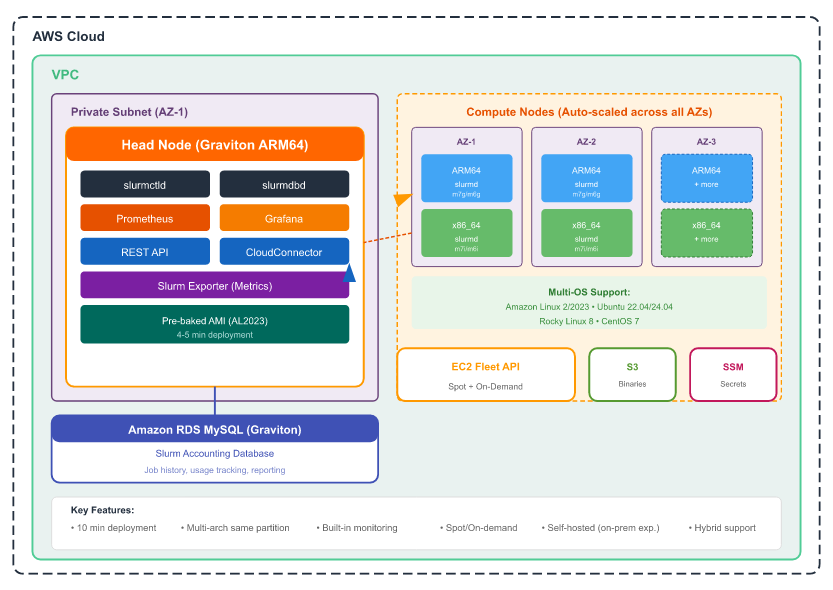
MatchQ runs entirely inside your AWS account. Nothing phones home. No provider-managed components.

  • Slurm head node (ARM64 Graviton) running scheduler, accounting, and cluster services
  • Auto-scaled compute nodes across availability zones (spot and on-demand, mixed architectures)
  • RDS MySQL for Slurm accounting database
  • Monitoring stack on the head node
  • CloudFormation-managed: deploy, update, and tear down cleanly
  • Optional: hybrid connectivity for on-premises workers managed from the same controller
Our Cloud Migration Services
chat-icon

Deploy MatchQ on AWS

Production-grade Slurm in your VPC. Get full access, integrated monitoring, no per-instance fees, and Modality’s HPC engineering team behind you.

Request a Demo